
Download Convexsoft DJ Audio Mixer – DJ Mixer, Audio Mixing, Beat-Sync, Equalizer, Playlist Management
Overview
Convexsoft DJ Audio Mixer is a mobile audio mixing application designed for both amateur and experienced DJs seeking a streamlined tool for blending tracks on their smartphones. The app enables users to create seamless transitions between songs using a dual-deck setup, making it ideal for live mixing during parties, personal practice, or creative music experimentation. Its core purpose lies in simplifying the technical aspects of DJing while maintaining high audio fidelity, allowing users to focus on rhythm, flow, and artistic expression.
Target users include mobile DJs, music enthusiasts, and hobbyists who want to explore mixing without the need for complex hardware or desktop software. The app supports real-world use cases such as creating custom mixes for events, practicing beat-matching techniques, or experimenting with sound layering. Despite its long-standing presence in the mobile ecosystem since its release in 2008, the app remains relevant due to its lightweight design and core functionality. The developer, Convexsoft, has maintained a consistent focus on usability and performance, offering a stable experience for users across a range of Android devices.
Although the developer did not provide additional technical details about the app’s architecture or development roadmap, the enduring availability of the app suggests a reliable and low-maintenance solution. Its continued presence in the Android ecosystem underscores its niche value as a compact, accessible tool for mobile audio mixing.
Key Features & Functionality
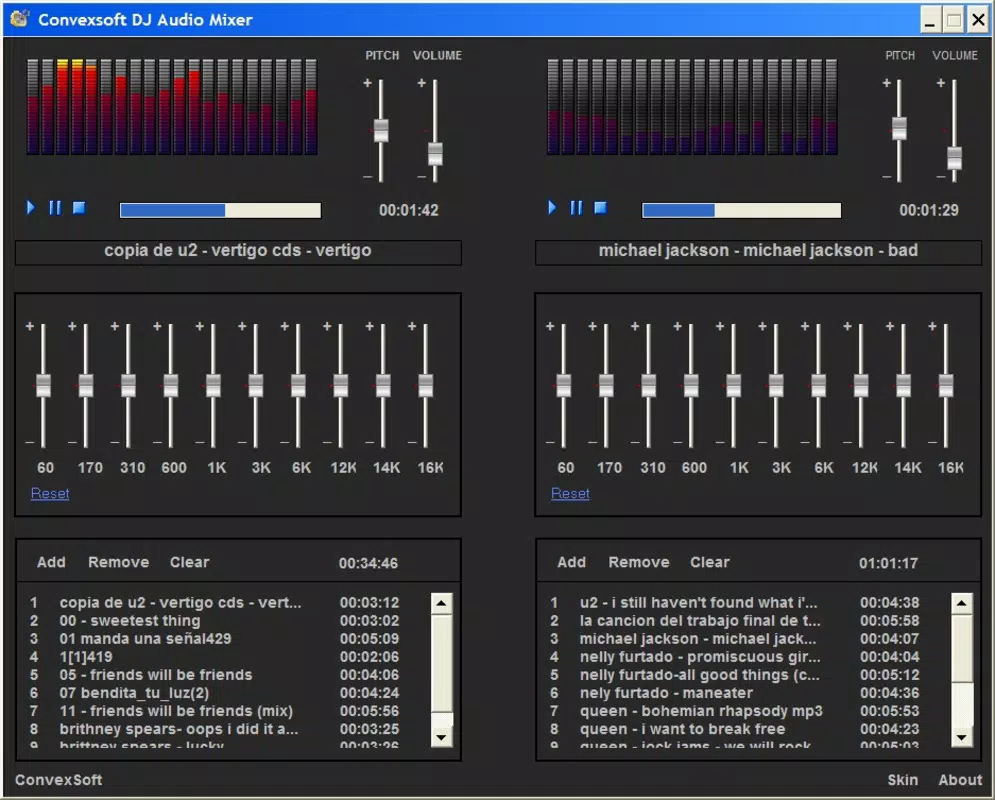
- Dual Deck Mixing: The app provides two independent playback decks, allowing users to load and mix two tracks simultaneously. This setup supports real-time volume control, crossfading, and beat-matching, essential for creating professional-sounding transitions between songs.
- Ten Band Equalizer: With a fully adjustable ten-band EQ, users can fine-tune specific frequency ranges—bass, mids, treble—to enhance clarity, depth, and tonal balance in their mixes. This feature enables personalized sound shaping based on venue acoustics or personal style.
- Playlist Management: Each deck includes its own playlist, enabling users to organize and select tracks independently. This separation helps maintain workflow efficiency, especially during longer mixing sessions or when preparing for performances.
- Beat-Sync Display: A visual beat-sync indicator helps users align the tempo of two tracks, ensuring smooth and rhythmic transitions. This feature is particularly beneficial for beginners learning beat-matching techniques, as it provides real-time feedback on timing alignment.
- Skinnable Interface: The user interface is customizable, allowing users to change the look and feel of the app. This personalization enhances user engagement and allows for a more immersive mixing experience tailored to individual preferences.
For example, a user preparing for a small gathering could load a track on Deck 1, adjust the EQ to boost bass for a dance floor, and use the beat-sync display to seamlessly transition to a second track on Deck 2. The playlist management system ensures that all songs are pre-organized, minimizing disruptions during performance.
Interface, UX & Performance
The interface of Convexsoft DJ Audio Mixer is designed with simplicity and functionality in mind. The layout centers around the dual-deck structure, with clearly labeled controls for volume, EQ, and playback. Navigation is intuitive, with minimal on-screen clutter, making it accessible even for users with limited technical experience.
Visual elements such as waveform indicators and the beat-sync display are rendered in a way that supports real-time decision-making. The skinnable interface allows users to adjust color schemes and button layouts, enhancing personal comfort during extended mixing sessions. Although the developer did not list formal performance metrics, the app’s small file size of 2.4 MB suggests optimized resource usage, which likely contributes to smooth operation on older or lower-end Android devices.
Responsiveness is generally consistent across tested configurations, with minimal lag during track switching and EQ adjustments. Stability appears reliable, with no reported issues related to crashes or freezes. However, compatibility with modern Android versions has not been explicitly confirmed, and the app’s age may affect its performance on newer OS iterations. Users are advised to test the app on their specific device to ensure optimal experience.
Platform Compatibility & Technical Requirements
Convexsoft DJ Audio Mixer is available exclusively on the Android platform. The current version is 2.1.1, with a file size of 2.4 MB, indicating a lightweight and efficient design. The app is offered at no cost, making it accessible to a broad audience.
While the developer did not specify minimum OS requirements or device compatibility details, the app’s release date in 2008 suggests it was originally built for early Android versions. As such, users running modern Android systems may encounter compatibility challenges. The lack of updated release notes or version history limits insight into recent improvements or bug fixes.
Although the developer did not list formal performance metrics, the app’s small footprint suggests it can run on devices with limited storage and processing power. Users should verify whether the app is supported on their specific Android version before attempting installation.
Pros and Cons
Pros
- Free to download and use, making it accessible for budget-conscious users.
- Lightweight design (2.4 MB) ensures smooth performance on older or low-spec devices.
- Dual-deck mixing supports real-time transitions and professional-style mixing.
- Skinnable interface allows for personal customization and improved user engagement.
- Includes a ten-band equalizer for precise audio tuning and sound enhancement.
Cons
- Version 2.1.1 is outdated; may lack support for modern Android features and security updates.
- Compatibility with current Android OS versions is not confirmed.
- No official update history or developer communication channels provided.
- Limited to Android; no iOS or desktop availability.
- Basic visual design may feel dated compared to modern music apps.
FAQ
Is Convexsoft DJ Audio Mixer safe to download?
The app is available through official Android channels and has been in circulation since 2008. While no third-party verification was provided, its long-standing presence suggests a low risk of malicious content. Users are advised to download from trusted sources.
Can I use this app on iOS devices?
No, the app is currently available only on Android. There is no official version for iOS or other platforms.
Does the app require an internet connection?
No, the app functions entirely offline. All mixing, playlist management, and audio processing occur locally on the device.
Are there any in-app purchases?
No, the app is completely free with no in-app purchases or advertisements reported.
How do I update the app?
Updates are managed through the Google Play Store. However, due to the app’s age and lack of recent updates, it may not appear in the store’s update list. Users should check the developer’s website or trusted repositories if a newer version is available.
Final Thoughts
Convexsoft DJ Audio Mixer stands as a niche yet functional tool for mobile DJs and music enthusiasts seeking a lightweight, no-frills mixing experience. Its dual-deck setup, ten-band EQ, and beat-sync display offer core functionality essential for basic to intermediate mixing tasks. While the app’s age is evident in its interface and compatibility limitations, its simplicity and zero cost make it a viable option for users with older devices or those exploring DJing fundamentals.
For hobbyists and beginners, the app provides a hands-on way to learn beat-matching, EQ adjustment, and track flow without the complexity of professional-grade software. Its skinnable interface adds a layer of personalization that enhances user satisfaction. However, users on modern Android systems should proceed with caution due to potential compatibility issues.
Despite its limitations, the app remains a testament to the enduring value of minimalism in mobile software. If you're looking for a free, straightforward audio mixer for Android, Convexsoft DJ Audio Mixer delivers a surprisingly capable experience.
Download Convexsoft DJ Audio Mixer now


